GRADEBOOK TOOLS BLOG
How to set up a class gradebook with category weights?
Short answer: List syllabus categories whose weights sum to 100%, enter each student’s average inside each category, then compute overall = Σ (category% × weight). With Homework 20%, Quizzes 30%, and Exams 50%, a student at 92 / 88 / 85 finishes at 87.3%.
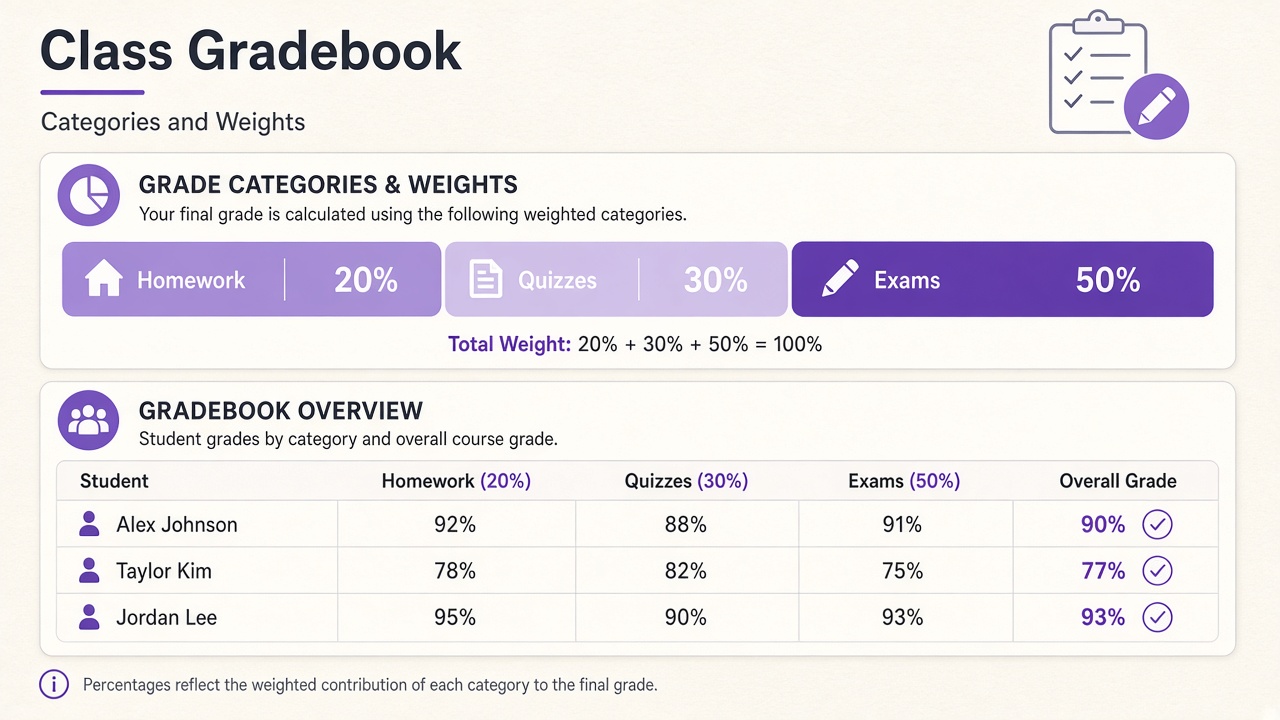
Start from the syllabus, not the roster
A class gradebook is only as clear as its categories. Write the names and weights before typing scores:
- Homework — 20%
- Quizzes — 30%
- Exams — 50%
- Total — 100%
If weights do not sum to 100%, either fix the syllabus numbers or normalize deliberately and document that choice. Silent renormalization confuses parents and auditors.
What belongs inside a category
Each category average should already reflect that category’s own rules—dropped lowest quiz, equal weighting of homework sets, and so on. The course-level gradebook then only applies the category weights.
Worked roster math
Example: 92×0.20 + 88×0.30 + 85×0.50 = 18.4 + 26.4 + 42.5 = 87.3%
Apply the identical weights to every student. That consistency is what makes a multi-student gradebook trustworthy.
| Student | HW | Quizzes | Exams | Overall |
|---|---|---|---|---|
| Alex | 92% | 88% | 85% | 87.3% |
| Taylor | 78% | 82% | 75% | 77.7% |
| Jordan | 95% | 90% | 93% | 92.5% |
(Taylor: 78×0.2 + 82×0.3 + 75×0.5 = 15.6 + 24.6 + 37.5 = 77.7%. Use one consistent rounding rule across the roster.)
Points vs percentages
Some teachers store raw points inside a category and convert to a percent before weighting. Others weight total points across the whole course. Mixing the two models without converting first is a frequent source of “my LMS shows something else” emails.
Practical setup checklist
- Copy category names and weights from the syllabus.
- Decide missing-work and late policies before the first zero appears.
- Enter category averages (or let a tool compute them from assignments).
- Export a CSV backup after major grading sessions.
- When an exam is curved, curve inside the Exams category, then refresh overalls.
Use the class gradebook tool
The free class gradebook keeps a multi-student roster with shared category weights and CSV export. For a single student planning one course, the home gradebook calculator is enough. For a single shared test across the room, use the teacher grader.
Single-student vs whole-class tools
Parents often need one course average; teachers need the same weights applied to thirty names. Keep one source of truth for category weights. If you change Exams from 50% to 45% mid-term, update the shared gradebook and regenerate every overall the same day so report comments stay consistent.
Export and privacy
Browser gradebooks that never upload rosters still benefit from a local CSV after each major grading session. Strip student emails before sharing files with TAs. Official grades still live in the school SIS—the class gradebook is a planning and communication layer, not the transcript of record.
Drop-lowest and extra credit without breaking weights
Drop-lowest rules belong inside a category: average the remaining quizzes, then apply the 30% quiz weight. Extra credit should be defined as either raising a category cap, adding a separate weighted category, or adding bonus points after the weighted sum. Pick one approach and write it on the syllabus. Sliding extra credit into “Exams” without changing the denominator is a common way to surprise students who reverse-engineered their averages.
From first week to report cards
Week 1: publish categories and weights. Mid-term: export CSV, spot-check three students by hand. Before report cards: lock category averages, apply any announced curve, recalculate overalls, then transfer marks to the SIS. The class gradebook is built for that classroom loop; pair it with the grade curve calculator when an exam needs a transparent remap.
Worked weight change mid-semester
Original weights HW 20 / Quizzes 30 / Exams 50. After a cancelled unit, Exams become 40 and a Project category appears at 10%. For Alex at HW 92, Quizzes 88, Exams 85, Project 90:
Tell students the day weights change, re-export the roster, and keep the old CSV labeled with the previous scheme so earlier progress reports remain explainable.